Who is this switch best for?
- Office LAN expansion
- CCTV and IP camera networks
- WiFi access point connectivity
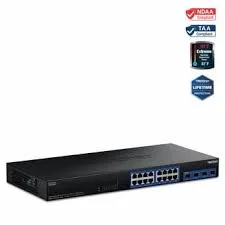
Works with standard Ethernet networking equipment including routers, computers, IP cameras, access points and servers. Confirm port, PoE and mounting requirements before purchase.
Check the product label or manufacturer datasheet for exact input voltage, power adapter and PoE requirements.
The Zyxel GS1900-24HP combines Gigabit Ethernet connectivity, PoE+ power and browser-based management for business networks. It suits offices, schools, hotels and CCTV installations that need to connect and power compatible devices while controlling how traffic moves across the network.
Its 24 Gigabit PoE+ copper ports and two additional Gigabit SFP slots provide connections for workstations, access points, IP phones, cameras and fibre uplinks. The documented 170W total PoE budget should be checked against your devices’ combined requirements before purchase. prodotti.zyxel.it
Request a quotation from Network Switch Kenya confirming the exact model, hardware revision, accessories, warranty and delivery arrangements. Specify GS1900-24HP, since the non-PoE GS1900-24 and the GS1900-24HPv2 are separate versions.
These figures follow Zyxel’s original GS1900-24HP documentation. Confirm them against the unit offered. The SFP slots are Gigabit uplinks, rather than 10G SFP+ interfaces. prodotti.zyxel.it
PoE can simplify installation by carrying data and power through the same cable. This is useful for compatible access points, IP phones and cameras located away from convenient power outlets.
Check each device’s required PoE standard and maximum demand. Passive-PoE equipment may require a suitable converter or different power arrangement.
A 170W budget cannot supply 30W to all 24 ports simultaneously. Plan using device power requirements, cable losses and spare capacity for future additions.
Manage Different Parts of Your NetworkThe GS1900 series provides configurable VLANs, traffic-priority functions, link aggregation and loop-control features. These allow a more deliberate network design than a basic unmanaged switch. download.zyxel.com
For example, you can plan separate VLANs for staff equipment, cameras and guest access. Your router or firewall must also support the required routing and access policies; creating VLANs on the switch alone does not complete that design.
Connect Fibre UplinksThe additional SFP slots can connect compatible fibre modules without consuming copper ports. Select modules that match the switch, fibre type, distance and equipment at the opposite end.
Budget for transceivers and fibre cables separately unless they are included in your quotation.
Centralise CablingRack installation can bring Ethernet connections and powered devices into one equipment cabinet. Labelled patch panels and cables make maintenance easier.
Allow ventilation space and consider fan noise when positioning the cabinet near workspaces.
Calculate the total power requirement before selecting the switch. Use each device’s manufacturer specifications rather than relying only on its normal idle consumption.
For illustration:
Planned equipmentAssumed demand per deviceCombined demand6 access points15W90W6 cameras8W48WTotal assumed demand—138WThese are planning examples, not verified ratings for specific devices. Account for allocation settings, startup demand and cable losses before deciding how much spare capacity remains.
Compare device compatibility and power budgets when reviewing the supplied UniFi Standard 24 PoE listing. Its powered-port arrangement should be checked separately rather than assumed to match the Zyxel.
Connect workstations and compatible PoE phones or access points. Plan management access and department separation before deployment.
Schools and Training FacilitiesSupport classroom equipment and wireless access points from a central cabinet. Consider both aggregate traffic and power requirements.
Hotels and GuesthousesUse a planned network design to separate guest access from administrative systems. The gateway, access points and switch configuration must work together to enforce the intended policies.
CCTV InstallationsConnect compatible PoE cameras and recording equipment. Check camera power demand, recorder bandwidth and the traffic crossing each uplink.
A switch with more camera connections does not increase an NVR’s supported channel count.
For other powered-switch options, browse the supplied Ubiquiti PoE switch category at Orbitlink Solutions.
List the equipment to connect, its power requirements and its intended network.
Identify:
Use Cat5e or Cat6 cables suitable for the installation. Keep standard copper Ethernet channels within 100 metres.
2. Install the SwitchMount it securely using the correct rack accessories. Keep ventilation openings clear and support cable bundles.
Provide suitable mains power and, where required, a UPS sized for the switch and connected PoE load.
3. Make the Initial Management ConnectionFor a new factory-default unit, connect a computer directly to a copper port before placing the switch on a network where its default address might conflict with another device.
Zyxel documents the default management address as 192.168.1.1, with username admin and password 1234. Follow the supplied guide if the actual unit’s defaults differ. Change the password immediately. Zyxel Support Campus EMEA
If necessary, temporarily give the computer an unused address such as 192.168.1.10 with subnet mask 255.255.255.0, then open the switch’s management address in a browser.
For an already configured switch, obtain its current address and credentials. Avoid resetting an existing installation without preserving its configuration.
4. Set a Suitable Management AddressAssign an unused management address appropriate for your network, outside any conflicting DHCP allocation.
Record the address, subnet mask and gateway where required. Reconnect at the new address after applying the change.
Restrict management access to authorised administrators.
5. Check FirmwareUse Zyxel’s official support resources to identify firmware for the exact model and hardware revision.
Back up the configuration before updating an existing installation. Follow the release notes and perform the update during a suitable maintenance period with stable power.
6. Configure VLANs if RequiredCreate the intended VLANs and assign ports according to their role:
Preserve a working management path while making changes. Configure the router, firewall and access points consistently.
7. Connect and Check PoE DevicesConnect compatible devices, then inspect the PoE status and power allocation.
Configure priorities so essential equipment is considered first if the power budget becomes constrained. Leave capacity for startup demand and future additions.
Do not assume that every connected device can receive its maximum port power simultaneously.
8. Configure Loop Protection and AggregationEnable the appropriate spanning-tree or loop-protection settings for your topology.
Use link aggregation only when both ends support and have matching configuration. Do not add duplicate switch connections casually, as they can create a network loop.
9. Connect the Router and UplinksAttach the configured router or upstream switch using the planned copper or SFP connection.
For a different switching requirement, assess the supplied MikroTik CRS326-24G-2S+RM listing separately. Confirm its power and uplink capabilities against your intended installation.
10. Save and TestSave the configuration to persistent memory. Zyxel’s guide distinguishes applied settings from the configuration saved for use after power loss. download.zyxel.com
Test internet access, device communication, VLAN separation and PoE operation. Export a backup and record port assignments, management details and module types.
Confirm that the quotation includes the switch, appropriate power cord and rackmount accessories. Ask separately about documentation, SFP modules, fibre leads and Ethernet cables.
The supplied package and warranty should be confirmed for the exact hardware revision and product condition.
They are PoE-capable, but simultaneous power delivery is constrained by the total budget and allocation settings.
Does PoE+ mean 30W is available to every device?Up to 30W is the switch-side port limit. Device power is also affected by the total budget and cable losses.
Does it replace a router?No. Use a suitable router or firewall for internet access and network policies.
Are the SFP ports 10Gbps?No. This model provides Gigabit SFP uplinks.
Does it require a UniFi controller?No. It uses Zyxel’s management interface.
Can it separate staff and camera networks?Yes, through an appropriately configured VLAN design, with the router or firewall enforcing the required access policies.
Request the Zyxel GS1900-24HP 24-Port Gigabit PoE+ Smart Switch from Network Switch Kenya.
Confirm the exact revision, PoE requirements, accessories, warranty and delivery arrangements. For a simpler network that does not need PoE or smart management, compare the TP-Link TL-SG1024 Gigabit switch.
Zyxel GS1900-24HP 24-Port Gigabit PoE+ Smart Switch is currently listed as available. Stock can change, so confirm availability before placing a large order.
The current listed price is KSh 60,000.00. Prices are generated from the product catalogue and may change when inventory is updated.
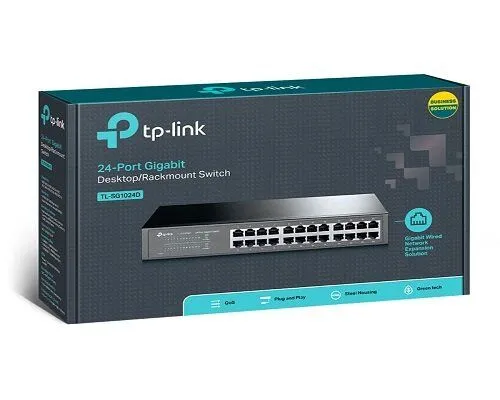
TP-Link
24-Port | Gigabit | Unmanaged
In Stock
TP-Link
24-Port | Gigabit | Unmanaged
In Stock
TP-Link
24-Port | Fast Ethernet | Unmanaged
In Stock
D-Link
24-Port | Fast Ethernet | Unmanaged
In Stock