Who is this switch best for?
- Office LAN expansion
- CCTV and IP camera networks
- WiFi access point connectivity
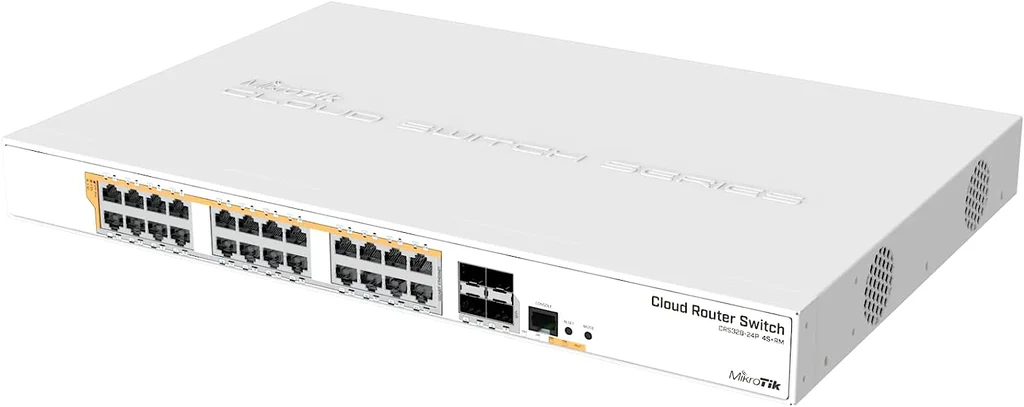
Works with standard Ethernet networking equipment including routers, computers, IP cameras, access points and servers. Confirm port, PoE and mounting requirements before purchase.
Check the product label or manufacturer datasheet for exact input voltage, power adapter and PoE requirements.
The MikroTik CRS328-24P-4S+RM combines powered Gigabit connections, high-speed uplinks and configurable network management in a rackmount switch. It suits offices, schools, hotels, surveillance systems and other installations connecting compatible cameras, wireless access points and IP phones.
It provides 24 Gigabit Ethernet ports with PoE output and four additional 10G SFP+ interfaces. The 450W PoE budget is divided into three independent 150W groups, making power distribution across the ports an important part of installation planning. MikroTik Documentation
Request the current MikroTik CRS328-24P-4S+RM price in Kenya from Network Switch Kenya, including compatible uplink accessories, cabling and installation services.
The CRS328-24P-4S+RM belongs to MikroTik’s Cloud Router Switch family. It supports RouterOS or SwOS, allowing administrators to choose between a broader configuration environment and a switch-focused interface.
Its Ethernet ports support different PoE arrangements, including standards-based and compatible passive-powered equipment. Correct voltage and device compatibility must be established before enabling power.
The built-in 500W power supply is not a 500W endpoint power budget. The manufacturer specifies 450W for PoE devices, subject to the individual group and port limits.
Specifications follow MikroTik’s product information and hardware guide. CRS328-24P-4S+RM
PoE can simplify installations by carrying power and data through one Ethernet cable. This reduces the need for a mains adapter beside every compatible endpoint.
It is particularly useful for ceiling-mounted access points, corridor cameras and desk phones. Check each device’s required standard, voltage and maximum consumption before connecting it.
A device using an Ethernet connector is not automatically compatible with every PoE mode.
Faster Uplinks for Shared TrafficThe dedicated high-speed interfaces can connect suitable upstream switches, servers or storage systems.
This is useful when several powered endpoints generate traffic simultaneously. Each copper connection remains limited to Gigabit speed, while the faster uplink provides additional shared capacity.
The connected equipment, storage and applications must also support the intended workload.
Separate Data InterfacesThe uplinks are additional connections rather than shared copper/fiber combo pairs. This allows the copper ports to remain available for endpoints when the optical interfaces are used upstream.
Select compatible modules or cables according to both ends of each connection.
Choice of Management EnvironmentRouterOS provides MikroTik’s broader administration tools. SwOS focuses on switching through a browser.
Choose the environment your team can configure and maintain reliably. The operating systems run separately, and moving between them requires a planned reboot.
Do not assume that every feature or configuration behaves identically in both environments.
Remote Power ControlPoE administration can help technicians investigate or restart a connected device without visiting its location.
Use power cycling deliberately. Repeated restarts do not correct a failing cable, inadequate allocation or faulty endpoint.
The CRS328 has three limits to consider together:
A low total load can still overload one group if too many demanding devices are concentrated there.
Hypothetical allocationDevice demand before cable lossesPlanning resultEight 10W devices in one group80WLeaves group headroomEight 20W devices in one group160WExceeds the group allowanceSix 20W devices in each group360W overall; 120W per groupRequires further allowance for losses and peak demandTwenty-four 20W devices480W overallExceeds the total allowanceThese are planning examples, not guaranteed supported combinations.
Use maximum device demand, account for cable losses and leave headroom. Cameras may consume more when infrared lighting or heaters activate.
The switch supports several power-output arrangements, so configuration deserves particular attention.
For standards-compliant equipment, use the appropriate automatic detection arrangement. For passive-powered equipment, verify voltage, polarity, pinout and maximum demand.
MikroTik documents mode-B power delivery on pins 4/5 positive and 7/8 negative, along with configurable output behavior. MikroTik Documentation
Do not force power onto an unidentified endpoint. Confirm compatibility first, especially when replacing an existing injector or connecting equipment from another manufacturer.
Power compatible access points while connecting workstations and other equipment.
Plan the combined access-point load and distribute demanding devices across the power groups.
Surveillance SystemsCentralize camera connections and power near the recording network.
Check recorder channels, incoming bandwidth and storage separately. Test the installation during night operation where camera demand may rise.
Hotels and GuesthousesConnect selected phones, access points and cameras while implementing the required network segmentation.
Account for the complete operating load rather than assuming every endpoint consumes its typical value continuously.
Schools and Commercial PremisesSupport powered equipment distributed around the building, with uplinks to the wider network.
Document cable routes, endpoint locations and power-group assignments for maintenance.
Switching and CPU-based services have different performance characteristics. Do not treat the switch as a replacement for every dedicated router or firewall simply because RouterOS is available.
List every endpoint, its maximum consumption and required PoE mode.
Map devices to the three eight-port power groups. Spread high-demand equipment deliberately and retain allowance for losses and peak operation.
Identify upstream links, VLANs and the management network before installation.
2. Inspect and Mount the SwitchConfirm the complete model and inspect the supplied accessories.
Install it in a suitable rack using the correct hardware. Support cable weight, keep ventilation clear and allow access for maintenance.
Consider fan noise when locating the rack near occupied rooms.
3. Connect Mains PowerUse the correct IEC power cable and a suitable supply.
For backup operation, size the UPS for the switch’s operating load, connected PoE equipment and other essential devices. A powered switch alone does not keep a separately powered recorder or gateway running.
4. Establish Initial Management AccessUse a wired connection and follow the first-login instructions supplied with the unit.
MikroTik commonly uses 192.168.88.1 for factory management. Confirm the exact procedure and credentials for the supplied device; use label credentials where provided.
Perform initial setup separately from the production network if a default address could conflict with existing equipment. Set strong credentials immediately.
5. Preserve Existing SettingsIf the switch has already been configured, back it up before making changes.
Do not factory-reset working equipment merely to recover an unknown management address. Arrange authorized access or a controlled recovery procedure.
6. Choose the Operating SystemSelect RouterOS or SwOS according to the management plan.
Preserve the relevant settings before changing boot behavior and allow for the restart. Treat the two environments as separate configuration workflows.
7. Secure AdministrationAssign a recognizable device name and predictable management address.
Restrict access to authorized administrators and appropriate networks. Maintain a recovery connection while changing management VLANs or access restrictions.
In RouterOS, use Safe Mode where appropriate for changes that could disconnect your session.
8. Review FirmwareUse software intended for the exact model and selected operating system.
Review release instructions, preserve backups and maintain stable power during updates. Schedule changes when interruption is acceptable.
9. Establish Basic SwitchingInspect the existing bridge and port configuration before adding new entries.
For RouterOS, verify that supported traffic uses hardware offloading where intended. Avoid unnecessarily directing ordinary switched traffic through software processing.
10. Configure VLANsFor a typical segmented installation:
Apply filtering only after membership and management access are correct.
11. Configure PoE Before Adding the Full LoadVerify the output mode and voltage appropriate to each powered endpoint.
MikroTik provides PoE configuration and monitoring through RouterOS and SwOS. Use monitoring to inspect status and consumption rather than relying only on whether a device starts. MikroTik Documentation
Connect devices gradually and check both group and overall allocation.
12. Install Uplink AccessoriesUse compatible modules or direct attach cables.
For optical links, match fiber type, wavelength, connectors and distance. Confirm expected link establishment at both ends.
Begin with one upstream path. Configure supported aggregation or loop prevention before adding parallel links.
13. Test Under Expected LoadCheck cameras, phones, wireless clients and shared resources simultaneously.
Test high-demand endpoint functions, including night illumination where applicable. Investigate unexplained restarts or power faults before handover.
14. Back Up and DocumentRetain configuration backups, port assignments and power-group allocations.
Label cables and record the model of every uplink accessory. Store administrative recovery details securely.
For a UniFi deployment, compare the UniFi Standard 24 PoE and UniFi Pro 24 PoE. Check power capacity, powered-port counts, uplinks and management requirements.
Orbitlink Solutions also lists the USW-24-PoE and USW-Pro-24-PoE. Compare the complete specification rather than total port count alone.
If endpoints already have suitable power, consider the UniFi Standard 24, UniFi Pro 24 or MikroTik CRS326-24G-2S+RM as different managed options.
For basic unmanaged expansion, compare the TP-Link TL-SG1024D at Orbitlink Solutions.
Review the D-Link DGS-1024D at Tawa and its separate 24-port Gigabit switch listing, confirming the exact supplied model.
Reisen SEO lists the TP-Link TL-SG1024, TL-SG1024D and D-Link DGS-1024D.
These address simpler connection requirements where managed controls and integrated power are unnecessary.
Fast Ethernet switches belong to a different speed category. Relevant comparisons include the TL-SF1024D at Orbitlink Solutions and TL-SF1024 at Tawa.
Tawa also lists the D-Link DES-1024D unmanaged model and a separate DES-1024D desktop product.
Additional options include the DES-1024D at Reisen SEO and TP-Link TL-SF1024. Check connection speeds and power capabilities before selecting a replacement.
For an internal comparison, explore the TP-Link TL-SG1024 on Network Switch Kenya.
Confirm the quoted package includes the correct mains cable, rackmount ears and fastening accessories.
Specify transceivers, direct attach cables, fiber leads, Ethernet cables, UPS equipment and installation services separately unless expressly included. Verify warranty coverage and product condition before ordering.
Yes, subject to endpoint compatibility and the applicable port, group and overall limits.
Is the full power budget available to any group of ports?No. Each eight-port group has its own allowance.
Does it support 10Gbps links?Yes, through the four SFP+ interfaces with suitable accessories.
Can it run RouterOS and SwOS simultaneously?No. Dual boot means selecting which operating system runs.
Can it power equipment from other manufacturers?Yes, where standards, voltage and power requirements are compatible.
Does it provide PoE++?It is specified for IEEE 802.3af/at and compatible passive arrangements, rather than IEEE 802.3bt PoE++.
Contact Network Switch Kenya for a quotation on the MikroTik CRS328-24P-4S+RM. Share your endpoint models, maximum power requirements and uplink plan so the power-group allocation and accessories can be confirmed.
MikroTik CRS328-24P-4S+RM 24-Port PoE+ Switch Price in Kenya is currently listed as available. Stock can change, so confirm availability before placing a large order.
The current listed price is KSh 65,000.00. Prices are generated from the product catalogue and may change when inventory is updated.
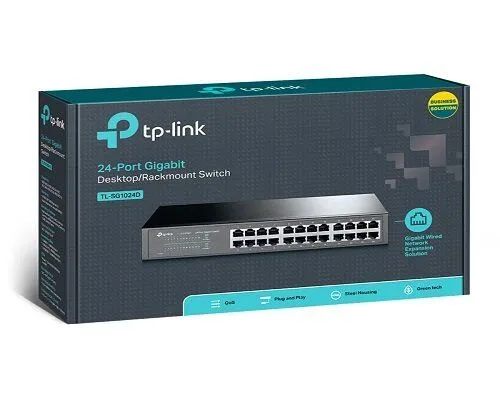
TP-Link
24-Port | Gigabit | Unmanaged
In Stock
TP-Link
24-Port | Gigabit | Unmanaged
In Stock
TP-Link
24-Port | Fast Ethernet | Unmanaged
In Stock
D-Link
24-Port | Fast Ethernet | Unmanaged
In Stock