Who is this switch best for?
- Office LAN expansion
- CCTV and IP camera networks
- WiFi access point connectivity

Works with standard Ethernet networking equipment including routers, computers, IP cameras, access points and servers. Confirm port, PoE and mounting requirements before purchase.
Check the product label or manufacturer datasheet for exact input voltage, power adapter and PoE requirements.
The Aruba Instant On 1930 24G, now part of the HPE Networking Instant On range, provides managed wired connectivity for offices, schools, shops and growing businesses. This description covers the JL682A non-PoE model, featuring 24 Gigabit Ethernet ports and four dedicated 1G/10G SFP+ uplinks.
It suits installations that need more control than an unmanaged switch, together with faster connections to servers or upstream networking equipment. Its fanless design also makes it practical for cabinets positioned near occupied workspaces. HPE
Request a quotation from Network Switch Kenya confirming JL682A, the supplied accessories, warranty and delivery arrangements. The 1930 series includes separate PoE models, so confirm the product code before ordering.
Specifications follow HPE’s JL682A documentation. The four uplinks are additional interfaces, giving 28 connection points in total. The 128Gbps figure describes aggregate switching capacity, rather than the speed of one port. HPE
The copper ports accommodate workstations, printers and other Ethernet equipment. The SFP+ interfaces provide faster uplink options when the connected equipment, modules and cables support them.
For example, a suitable 10Gbps server connection can provide more shared bandwidth than a single Gigabit connection. Individual computers connected to the copper ports still have a maximum link speed of 1Gbps.
Actual transfer performance depends on storage speed, endpoint capabilities and other network traffic.
More Control over Your NetworkThe 1930 series supports VLANs, link aggregation and traffic-management functions. Its local management feature set also includes capabilities such as IPv4 static routing and access controls. Available controls differ between management modes. HPE
A planned VLAN design can separate staff devices, cameras and guest access. Your router or firewall must enforce the intended access policies between those networks.
Choose Cloud or Local ManagementYou can manage the switch through the Instant On platform or its local web interface. Select the approach that suits your administration requirements.
These are alternative management modes. HPE documents that moving a locally managed switch to cloud management requires a factory reset, so make this choice before deployment where possible. instant-on.hpe.com
Quiet OperationFanless cooling avoids cooling-fan noise. Keep ventilation clear and allow space around the switch even though it has no cooling fan.
Rack installation can place it beside a patch panel for organised cabling and easier maintenance.
Connect workstations, printers and shared resources, with VLANs planned around departments or device roles.
Schools and Training FacilitiesProvide wired connections for classroom equipment and faster uplinks to suitable servers or other switches. Count infrastructure connections and leave spare ports for expansion.
Shops and Hospitality BusinessesUse a planned network design to separate administrative systems from guest access. Switch, gateway and access-point settings must work together to enforce the intended separation.
Shared Storage and Server NetworksThe uplinks can connect suitable higher-speed equipment. Check transceiver or DAC compatibility and the storage system’s actual performance before choosing accessories.
Networks with Separately Powered DevicesJL682A does not provide PoE. Cameras, phones and access points require suitable separate power arrangements.
If Ethernet power is essential, compare the supplied Ubiquiti USW-24-PoE listing at Orbitlink Solutions or UniFi Pro 24 PoE listing. Confirm their powered-port arrangements, budgets and management requirements separately.
List the devices, uplinks and VLANs required. Identify the management network and the equipment providing routing, DHCP and internet access.
Prepare:
Keep standard copper Ethernet channels within 100 metres.
2. Mount and Power the SwitchInstall the unit securely using the correct mounting accessories. Keep ventilation clear and support cable bundles.
Connect power and allow startup diagnostics to complete. Check the status indicators before connecting the full installation.
3. Locate Its Management AddressFor a new factory-default switch, connect it to a network with DHCP and check the router’s DHCP client list for its assigned address.
HPE documents a fallback address of 192.168.1.1 if DHCP assignment fails. To use that address, isolate the switch from any network with an address conflict and connect a computer directly using a suitable address such as 192.168.1.12/24. arubanetworking.hpe.com
For an existing installation, obtain its current credentials and configuration rather than resetting it casually.
4. Select a Management ModeFor cloud management: Follow the Instant On onboarding process, create or select the intended site, and add the switch. Ensure it has the connectivity needed to reach the service.
For local management: Open the switch’s address in a browser and select the local-management option.
The documented initial local login uses admin with a blank password. Follow the supplied guide if the actual defaults differ, and create a strong password immediately. arubanetworking.hpe.com
5. Set Management AddressingUse an appropriate DHCP reservation or static management address. Record the address and ensure it does not conflict with another device.
Configure subnet, gateway and DNS details as required. Restrict management access to authorised administrators.
6. Configure VLANsCreate the intended networks and assign ports according to their roles:
Match settings at both ends and preserve a working management path while making changes. Configure routing and firewall policies separately.
7. Connect Copper DevicesAttach computers, printers and other equipment to the planned ports. Label connections at the switch and patch panel.
PoE-dependent devices need compatible injectors or separate power supplies. JL682A will not power them directly.
8. Install Uplink AccessoriesSelect modules or DACs supported by the switch and the equipment at the other end.
For fibre, match the module type, wavelength, fibre type and link requirements. Do not assume every SFP+ accessory is compatible simply because it fits.
9. Configure Redundant Links CarefullyUse link aggregation only when both ends have matching supported configurations. Apply appropriate loop-protection or spanning-tree settings for the topology.
Avoid adding duplicate connections without a planned configuration.
10. Save and TestIn local mode, use Save Configuration after applying changes so settings survive a restart. arubanetworking.hpe.com
Test internet access, local communication, VLAN separation and uplink speeds. Back up the configuration where supported and record port assignments and accessory types.
For another managed switching platform, assess the supplied MikroTik CRS326-24G-2S+RM listing.
The supplied D-Link DES-1024D listing at Tawa is a basic Fast Ethernet alternative. Its speed and management capabilities differ substantially from this Aruba model.
Confirm that your quotation includes:
Ask separately about transceivers, DACs, fibre leads, Ethernet cables and the cabinet. Confirm warranty terms for the exact unit and product condition.
No. This description covers the non-PoE JL682A.
Are the uplinks additional to the 24 copper ports?Yes. It has four dedicated SFP+ interfaces alongside the copper ports.
Can it replace my internet router?It does not replace a suitable internet gateway or firewall. Plan routing, security and ISP connectivity separately.
Can I manage it locally?Yes. Select local web management and follow the matching guide.
Can I use cloud and local management simultaneously?They are alternative management modes. Review the migration procedure before changing modes.
Can it separate staff and guest networks?Yes, through an appropriately configured VLAN design, with the gateway enforcing the required access policies.
Request the Aruba Instant On 1930 24G JL682A from Network Switch Kenya. Confirm the product code, management approach, uplink accessories, warranty and delivery arrangements.
For a simpler installation requiring ordinary Gigabit connectivity, compare the TP-Link TL-SG1024 unmanaged switch.
Aruba Instant On 1930 24G 24-Port Gigabit Managed Switch Price in Kenya is currently listed as available. Stock can change, so confirm availability before placing a large order.
The current listed price is KSh 38,000.00. Prices are generated from the product catalogue and may change when inventory is updated.
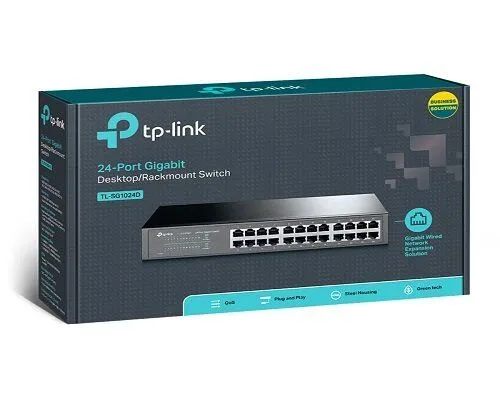
TP-Link
24-Port | Gigabit | Unmanaged
In Stock
TP-Link
24-Port | Gigabit | Unmanaged
In Stock
TP-Link
24-Port | Fast Ethernet | Unmanaged
In Stock
D-Link
24-Port | Fast Ethernet | Unmanaged
In Stock